顯示具有 JPA 標籤的文章。 顯示所有文章

2010年11月29日 星期一

資料庫的Isolation需求

資料來源

Isolation是資料庫系統的ACID其中的一個屬性。它是用來定義一個操作針對資料所做的修改 如何/何時 被另一個操作所看到。資料庫的Isolation層級從最高到最低排序如下。應用程式開發人員必需依照實際的需求,選用適當的Isolation層級。Isolation層級愈高,愈可能發生deadlock現象;相反地,層級愈低,資料愈可能出現不可預期的不一致現象

Serializable:

Serializable是最高的Isolation層級。在此層級之下,交易是依序執行的。也就是說,同一時間內,只能有一個交易針對同一組資料進行操作。雖然資料庫系統仍可允許多個交易同時進行,但是一定要維持交易是依序執行的一個假象。

若以Lock的方式來實作Serializable,當資料庫遇到查詢中有WHERE子句時,就會Acquire一個Range Lock來鎖住WHERE子句條件中,所有牽涉到的資料;另一種非Lock的實作機制,因其不Acquire Lock,所以必需偵測當前的交易是否違反了Serializable的假象,若有違反,必需Rollback交易。Optimistic lock即為一種非Lock的實作機制

Repeatable Read:

在此層級下,所有被SELECT語句碰觸到的資料都不能被其它交易所更動。也就是說,資料庫會保證在交易的範圍中,重覆讀取同一筆資料,得到的值都是一樣的。與Serializable的差別在於,Repeatable Read不會Acquire range lock,也就是說,它是讀到一筆資料後,才將該筆資料鎖住,而不會鎖住符合WHERE條件的所有資料。因為不Acquire rangle lock,可能會有phantom reads的情形發生。亦即,在同一個交易中,做兩次的SELECT,可能得到不同數目的Records。

Read Committed:

在此層級下,已被一個交易讀取的資料,可以被另一個交易修改,因此無法得到Repeated Read的結果。Read的Lock在資料讀到之後,就馬上放掉;而Write的Lock還是會持續到整個交易結束後才放掉

Read Uncommitted:

此層級是最鬆的層級,在此層級下,一個交易可以讀到被改動,而尚未Commit的資料。

2010年9月16日 星期四

在Hibernate中Config Connection Pool

今天試著在Hibernate中Config Connection Pool時發現 Hibernate3.3.1 GA版裡面,已經將C3P0ConnectionProvider這個class搬到 hibernate-c3p0-3.3.1.GA.jar這個Jar中了,可以到這個網址下載http://www.java2s.com/Code/Jar/GHI/Downloadhibernatec3p0331GAjar.htm

把它加到build path後,編輯persistence.xml。Mark紅色的部分,即為新增的Connection Pool設定。

<?xml version="1.0" encoding="UTF-8"?>
<persistence version="1.0" xmlns="http://java.sun.com/xml/ns/persistence" xmlns:xsi="http://www.w3.org/2001/XMLSchema-instance" xsi:schemaLocation="http://java.sun.com/xml/ns/persistence http://java.sun.com/xml/ns/persistence/persistence_1_0.xsd">
    <persistence-unit name="Test">
        <provider>org.hibernate.ejb.HibernatePersistence</provider>
            <properties>
                <property name="hibernate.connection.driver_class" value="com.ibm.db2.jcc.DB2Driver"/>
                <property name="hibernate.connection.password" value="db2admin"/>
                <property name="hibernate.connection.url" value="jdbc:db2://localhost:50000/puli"/>
                <property name="hibernate.connection.username" value="db2admin"/>
                <property name="hibernate.default_schema" value="db2admin"/>
                <property name="hibernate.dialect" value="org.hibernate.dialect.DB2Dialect"/>
                    <!--使用c3p Connection Pool -->
                <property name="hibernate.connection.provider_class" value="org.hibernate.connection.C3P0ConnectionProvider" />
                <property name="hibernate.c3p0.max_size" value="100" />
                <property name="hibernate.c3p0.min_size" value="3" />
                <property name="hibernate.c3p0.acquire_increment" value="1" />
                <property name="hibernate.c3p0.idle_test_period" value="300" />
                <property name="hibernate.c3p0.max_statements" value="0" />
                <property name="hibernate.c3p0.timeout" value="100" />
            </properties>
    </persistence-unit>
</persistence>

回到使用JPA的程式碼,假設在以下的程式碼中,在把程式由原本的standalone轉成使用connection pool後,不能在程式碼裡面呼叫JPAUtil.shutdown()這個方法,因為這個方法會把connection中斷。

public class PuliTest {
    public static void main(String[] args) {
        EntityManager newEntityManager =
        JPAUtil.getEntityManagerFactory().createEntityManager();
        EntityTransaction newEtx = newEntityManager.getTransaction();
        newEtx.begin();
        PatientBasicInfo patient = (PatientBasicInfo) newEntityManager.find(PatientBasicInfo.class, "12345");
        System.out.println(patient.getPatientfirstname());
        System.out.println(patient.getPatientlastname());
        System.out.println(patient.getPatientaddress());
        newEtx.commit();
        newEntityManager.close();
        //JPAUtil.shutdown(); 在使用connection pool的程式中,需 comment掉此method call
    }
}

2010年9月15日 星期三

使用Hibernate的JPA實作來 由DDL產生Domain Object

JPA是Java的Persistent標準,針對這個標準,不同單位有不同的實作方式,而Hibernate提供了其中一種實作的選擇。Hibernate是透過Hibernate Annotations(包含hibernate-annotations.jar、hibernate-commons- annotations.jar與ejb3-persistence.jar這些jar)和 Hibernate EntityManager(包含hibernate-entitymanager.jar這個jar) 這兩個component來進行實作。

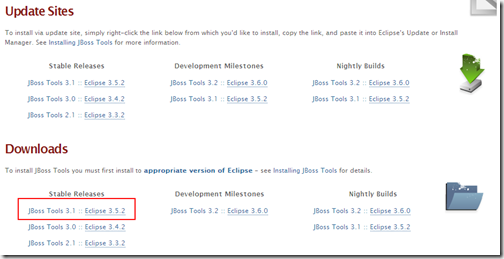
為了免除尋找這些jar的麻煩,可以直接到Jboss Tools下載Jboss的Tool pakcage,裡面就直接包含了所有Jboss的工具,包含Hibernate。下載網址:http://www.jboss.org/tools/download  (請注意不同版本的Jboss Tool需搭配不同的eclipse版本)  如下圖,可選擇Download: 下面的下載連結,把整個 package的zip下載後並解開後,再用Eclipse的add new site功能,把整個package安裝到eclipse中

image

安裝完後,開始下列步驟

  1. 打開eclipse,新增一個JPA project,填上專案名稱後按下一步
    image
  2. 設定產生的程式碼要放在那個目錄下,按下一步
    image
  3. 在JPA Facet對話框的上半部,先設定platform為Hibernate,然後在JPA Implementation中,設定Type為User Library。然後點選紅色框框處,以設定User Library
     image
  4. 新增一個User Library Entry,為其名命後按Add Jar,到下列目錄把所有的jar檔加到這個User Library Entry下
    \eclipse\plugins\org.hibernate.eclipse_3.3.1.v201006011046R-H111-GA\lib\hibernate\*.jar
    \eclipse\plugins\org.hibernate.eclipse_3.3.1.v201006011046R-H111-GA\lib\tools\*.jar
    \eclipse\plugins\org.hibernate.eclipse_3.3.1.v201006011046R-H111-GA\lib\annotations\*.jar
    image
  5. 加完之後,回到JPA Facet對話框,勾選剛才新建的User Library
    image
  6. 在JPA Facet對話框中間,點選 Add Connections
    image
  7. 此時會打開Database設定對話框,設定connection名稱後,按下一步
    image
  8. 在下一個對話框中,點選如下圖的圖示
    image
  9. 在New Driver Definition處,選定資料庫為IBM Data Server Driver for JDBC後,點選 Jar List的tab
    image
  10. 按下clear all後,重新指定db2 driver的位置
    image
  11. 完成後,回到設定資料庫連結對話框。完成後,按下finish
    image
  12. 回到JPA Facet,勾選下圖的設定後,按finish
    image
  13. 完成後,回到File—>New—>Others ,找到 JPA下的Entities From Tables
    image
  14. 一直按下一步,到下列對話框可以選擇要將那些Table Mapping成Entity。勾選完畢後,uncheck 同步class到persistence.xml,按下一步 
    image
  15. 對話框中會列出這些Table之間的association的關係
    image
  16. 填上產生的Code要到那個package下,按完成。即自動建立這些所需的class
    image
  17. 到此完成Domain class的建立。如前所述Hibernate是透過EntityManager這個Component來實作JPA的persistence。建立一個Utility class來取得EntityManager。若仔細看的話,可以發現EntityManager的角色類似Hibernate本身的Session

    package test.puli.util;

    import javax.persistence.EntityManagerFactory;
    import javax.persistence.Persistence;

    public class JPAUtil {
        private static EntityManagerFactory entityManagerFactory;
        static {
            try {
                entityManagerFactory =
                    Persistence.createEntityManagerFactory("Test"); //對應至persistence.xml中的persistent unit
            }
            catch(Throwable ex) {
                throw new ExceptionInInitializerError(ex);
            }
        }
        public static EntityManagerFactory getEntityManagerFactory() {
            return entityManagerFactory;
        }
        public static void shutdown() {
            getEntityManagerFactory().close();
        }
    }


  18. 再建立Test的class來進行測試

    import java.util.List;
    import javax.persistence.*;
    import test.puli.model.*;
    import test.puli.util.JPAUtil;

    public class PuliTest {
        public static void main(String[] args) {
            EntityManager newEntityManager =
            JPAUtil.getEntityManagerFactory().createEntityManager();
            EntityTransaction newEtx = newEntityManager.getTransaction();
            newEtx.begin();
            PatientBasicInfo patient = (PatientBasicInfo) newEntityManager.find(PatientBasicInfo.class, "12345");
            System.out.println(patient.getPatientfirstname());
            System.out.println(patient.getPatientlastname());
            System.out.println(patient.getPatientaddress());
            newEtx.commit();
            newEntityManager.close();
            JPAUtil.shutdown();
        }
    }

  19. 修改persistence.xml如下

    <?xml version="1.0" encoding="UTF-8"?>
    <persistence version="1.0" xmlns="http://java.sun.com/xml/ns/persistence" xmlns:xsi="http://www.w3.org/2001/XMLSchema-instance" xsi:schemaLocation="http://java.sun.com/xml/ns/persistence http://java.sun.com/xml/ns/persistence/persistence_1_0.xsd">
        <persistence-unit name="Test">
            <provider>org.hibernate.ejb.HibernatePersistence</provider>
                <properties>
                    <property name="hibernate.connection.driver_class" value="com.ibm.db2.jcc.DB2Driver"/>
                    <property name="hibernate.connection.password" value="db2admin"/>
                    <property name="hibernate.connection.url" value="jdbc:db2://localhost:50000/puli"/>
                    <property name="hibernate.connection.username" value="db2admin"/>
                    <property name="hibernate.default_schema" value="db2admin"/>
                    <property name="hibernate.dialect" value="org.hibernate.dialect.DB2Dialect"/>

                </properties>
        </persistence-unit>
    </persistence>

  20. 執行上述的class
     

2010年8月28日 星期六

Java Persistence Framework比較

資料來源:http://www.javaworld.com/javaworld/jw-07-2008/jw-07-orm-comparison.html

目前Java關於persistence的Framework主要有iBATIS、JPA和Hibernate三種,這篇文章簡單地介紹了如何選擇這三種framework來做persistence的處理。

他們之間的主要差異在於,iBAITS並沒有提供完整的O/R mapping,它所做的是Object與 SQL return result之間的mapping。而且iBAITS運作時,是直接使用內嵌的SQL來查詢資料庫,所以Programmer必需直接撰寫SQL,且必需綁定在資料庫伺服器的提供商。不過這種設計,programmer可以直接掌控SQL,所以能不斷tune出效能最好的SQL

Hibernate及JPA都有完整的O/R mapping的功能,它們都不直接採用SQL,而是有自己的查詢語言(雖然長得很像SQL),在執行時期再動態產生SQL進行資料庫查詢。也因為如此,使用其所開發的程式,不會有綁定在某家資料庫系統的問題。相較於Hibernate,JPA提供的是一組標準,任何provider都可以去實作JPA標準(如Apache的 OpenJPA),因此實際執行的效能及一些特性就必需看各家JPA provider實作的程度如何;而Hibernate本身就是一個實作,算是目前滿活躍的一個framework,有許多人在使用及維護。

最後iBAITS支援.NET、及Ruby on Rails;Hibernate支援Java及.NET;而JPA(Java Persistence API)當然只支援Java

Features iBATIS Hibernate JPA
Simplicity Best Good Good
Complete ORM solution Average Best Best
Adaptability to data model changes Good Average Average
Complexity Best Average Average
Dependence on SQL Good Average Average
Performance Best Best N/A *
Portability across different relational databases Average Best N/A *
Portability to non-Java platforms Best Good Not Supported
Community support and documentation Average Good Good